Get in touch today and we get get to the root of your issues
Official Hikvision Authorized Distributor in Malaysia
Run your whole security system from one app
Hik-Connect puts live view, playback, access control, video intercom and alarm control for your Hikvision devices in your pocket — set up and supported by VSH Group.
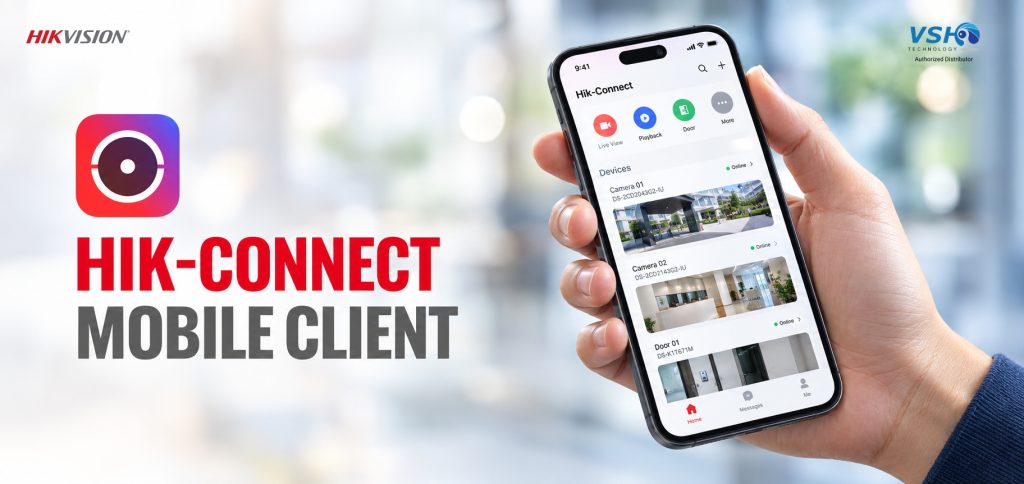
Works on Android 6.0+ and iOS 11.0+ · Current build V6.9.0
Official Hikvision Authorized Distributor in Malaysia
Run your whole security system from one app
Hik-Connect puts live view, playback, access control, video intercom and alarm control for your Hikvision devices in your pocket — set up and supported by VSH Group.
Works on Android 6.0+ and iOS 11.0+ · Current build V6.9.0
128 devices per account, Personal Mode
16 cameras live at once
37 languages supported
Compatible with DVR/NVR, cctv, intercoms & alarm
128 devices per account, Personal Mode
16 cameras live at once
37 languages supported
Compatible with DVR/NVR, cctv, intercoms & alarm
What’s inside the app?
Every part of your Hikvision setup
in one place
Hik-Connect brings monitoring, access and intercom together so your team isn’t switching between apps to check on a site.
Monitoring
Live view & playback
Watch up to 16 cameras at once and pull up recorded footage from the cloud or the device.
- 1/4/9/12/16 window split-screen
- Up to 8x digital zoom, PTZ control
- Search playback by time, download footage
Access Control
Open doors from anywhere
Remote door opening plus device and event management for sites running Hikvision access control.
- Remote opening, live event feed
- NFC and Bluetooth door opening
- Temporary passes for visitors
Intercom
Video intercom
Accept doorbell and door-station calls, view the linked camera, and control two-way audio remotely.
Alarm
Security control panel
Arm, disarm, bypass zones and clear alarms, with a one-tap panic button that shares your location.
Management
Device & cloud tools
Add devices by QR code or IP, push firmware updates, encrypt footage, and share access with your team.
What’s inside the app?
Every part of your Hikvision setup
in one place
Hik-Connect brings monitoring, access and intercom together so your team isn’t switching between apps to check on a site.
Intercom
Video intercom
Accept doorbell and door-station calls, view the linked camera, and control two-way audio remotely.
Alarm
Security control panel
Arm, disarm, bypass zones and clear alarms, with a one-tap panic button that shares your location.
Management
Device & cloud tools
Add devices by QR code or IP, push firmware updates, encrypt footage, and share access with your team.
Access Control
Open doors from anywhere
Remote door opening plus device and event management for sites running Hikvision access control.
- Remote opening, live event feed
- NFC and Bluetooth door opening
- Temporary passes for visitors
Monitoring
Live view & playback
Watch up to 16 cameras at once and pull up recorded footage from the cloud or the device.
- 1/4/9/12/16 window split-screen
- Up to 8x digital zoom, PTZ control
- Search playback by time, download footage
What’s inside the app?
Every part of your Hikvision setup
in one place
Hik-Connect brings monitoring, access and intercom together so your team isn’t switching between apps to check on a site.
Monitoring
Live view & playback
Watch up to 16 cameras at once and pull up recorded footage from the cloud or the device.
- 1/4/9/12/16 window split-screen
- Up to 8x digital zoom, PTZ control
- Search playback by time, download footage
Access Control
Open doors from anywhere
Remote door opening plus device and event management for sites running Hikvision access control.
- Remote opening, live event feed
- NFC and Bluetooth door opening
- Temporary passes for visitors
Intercom
Video intercom
Accept doorbell and door-station calls, view the linked camera, and control two-way audio remotely.
Alarm
Security control panel
Arm, disarm, bypass zones and clear alarms, with a one-tap panic button that shares your location.
Management
Device & cloud tools
Add devices by QR code or IP, push firmware updates, encrypt footage, and share access with your team.
Choose your setup
Personal mode or team mode
A household or single site usually runs fine on Personal Mode. Multi-site businesses with attendance and role management needs should move to Team Mode.
| Function | Personal Mode |
|---|---|
| Access | App only |
| Video channels | Up to 128, 16 live at once |
| Access control devices | 128 |
| ACS device & event management | Not included |
| Time attendance | Not included |
| Multi-site management | Not included |
| Sub-accounts | Device sharing with up to 10 accounts |
| OpenAPI | Not included |
| Function | Team Mode |
|---|---|
| Access | App & web portal |
| Video channels | Unlimited, up to 64 live at once |
| Access control devices | Unlimited |
| ACS device & event management | Included |
| Time attendance | Person management, shifts, reports, app clocking |
| Multi-site management | Included, with map management |
| Sub-accounts | Unlimited sub-accounts and roles |
| OpenAPI | Included |
Choose your setup
Personal mode or team mode
A household or single site usually runs fine on Personal Mode. Multi-site businesses with attendance and role management needs should move to Team Mode.
| Function | Personal Mode |
|---|---|
| Access | App only |
| Video channels | Up to 128, 16 live at once |
| Access control devices | 128 |
| ACS device & event management | Not included |
| Time attendance | Not included |
| Multi-site management | Not included |
| Sub-accounts | Device sharing with up to 10 accounts |
| OpenAPI | Not included |
| Function | Team Mode |
|---|---|
| Access | App & web portal |
| Video channels | Unlimited, up to 64 live at once |
| Access control devices | Unlimited |
| ACS device & event management | Included |
| Time attendance | Person management, shifts, reports, app clocking |
| Multi-site management | Included, with map management |
| Sub-accounts | Unlimited sub-accounts and roles |
| OpenAPI | Included |
Under the hood
Personal mode technical parameters
A household or single site usually runs fine on Personal Mode. Multi-site businesses with attendance and role management needs should move to Team Mode.
|
128 Max. connected devices via Hik-Connect Domain |
1024 Max. connected devices via static IP or domain |
16 / 4 Cameras for simultaneous live view / playback |
10 Accounts one channel can be shared with |
|
32 Favorites folders |
20 Max. streams per channel, live view |
H.264 / H.265+ Video encoding supported |
G711, AAC Audio encoding supported |
Under the hood
Personal mode technical parameters
A household or single site usually runs fine on Personal Mode. Multi-site businesses with attendance and role management needs should move to Team Mode.
|
128 Max. connected devices via Hik-Connect Domain |
1024 Max. connected devices via static IP or domain |
16 / 4 Cameras for simultaneous live view / playback |
10 Accounts one channel can be shared with |
|
32 Favorites folders |
20 Max. streams per channel, live view |
H.264 / H.265+ Video encoding supported |
G711, AAC Audio encoding supported |
Why go through VSH Group?
The app is available on App Store and Google Play. Getting it set up right isn’t always simple.
Genuine Hikvision hardware
Cameras, NVRs, intercoms and panels sourced as an authorized distributor, so device warranties and Hik-Connect binding work as expected.
Correct mode from day one
We help you decide between Personal and Team Mode based on how many sites and staff you actually need to manage.
On-site and remote support
Device binding, cloud storage setup, and account/role configuration handled by our team, not left to trial and error.
Let's Get Connected
Ready to connect your devices to Hik-Connect?
Tell us what you’re running — cameras, access control, intercom or alarm panel — and we’ll get it onto the right Hik-Connect setup.