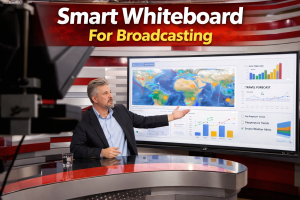

Smart whiteboard for broadcasting is an essential tool reshaping how newsrooms deliver live coverage, explain complex stories, and engage audiences in real time. Imagine a tool that can circle key data points on a live election map or diagram of a crime syndicate network while explaining it to millions of viewers. That is the power of a smart whiteboard for broadcasting.
In this article, we will see why it matters for live news production and how it can be utilized across different broadcast scenarios.
What Is A Smart Whiteboard For Broadcasting?

A smart whiteboard for broadcasting is an interactive touchscreen display designed specifically for live television production environments. Unlike traditional whiteboards or static graphics systems, these devices combine high-resolution displays. It comes with real-time annotation capabilities, broadcast-grade video outputs, and seamless integration into existing studio workflows.
At its core, a smart whiteboard functions as a digital canvas that anchors, meteorologists, and reporters can interact with using touch, stylus, or even gestures. The board displays content such as maps, charts, satellite imagery, video feeds, or documents. This can then be drawn on, highlighted, zoomed, or illustrated live on air.
Key technical features that distinguish smart whiteboards for broadcasting include:
- Broadcast Integration: Support for SDI (Serial Digital Interface) or NDI (Network Device Interface) outputs, allowing seamless connection to production switchers and broadcast chains.
- 4K Ultra HD Resolution: Crisp, clear visuals that meet broadcast quality standards.
- Multi-Touch Capability: Multiple presenters can interact simultaneously, enabling collaborative segments.
- Annotation Tools: Digital pens, highlighters, shape tools, and text overlays that mimic natural handwriting.
- Remote Collaboration: Integration with video conferencing tools to bring in field reporters or remote experts whose annotations appear in real time.
Smart whiteboards empower anchors to move beyond reading scripts and become active visual storytellers. This shift bridges the gap between dense data and audience comprehension, making every broadcast more engaging.
Why It Matters For News And Live Broadcast?

Live news broadcasting demands perfection under intense pressure. Stories evolve by the minute, and audiences crave clarity within the chaos. Static, pre-produced graphics fail to keep up. When news breaks or data shifts mid-show, producers and artists scramble to update visuals, causing costly delays.
A smart whiteboard for broadcasting addresses these challenges directly. Here is why it matters:
1. Real-Time Responsiveness
In the high-stakes world of live news, every second counts. Smart whiteboards turn “reacting” into “leading” by giving anchors the tools to visualize data the moment it arrives. Reporters can instantly pull up, analyze, and annotate weather shifts or election data live on air, eliminating the wait for pre-produced graphics.
2. Enhanced Clarity and Comprehension
Viewers understand and remember stories better when you show them the “why.” By drawing connections on screen, anchors turn complex financial trends and scientific data into clear, digestible segments. The smart whiteboard gives your team the power to map out abstract ideas in real time.
3. Authenticity and Trust
Modern viewers demand transparency in journalism. When an anchor draws on a map or circles a data point live, they demonstrate authenticity. By showing the analysis as it happens, your team builds trust in the reporting process and eliminates any hint of “pre-packaged” spin.
4. Cost Efficiency and Workflow Optimization
Traditional broadcast graphics drain time and resources. A single animated graphic often consumes hours of design, rendering, and approval. Smart whiteboards slash these pre-production costs by moving visual storytelling into the live environment. This shift empowers smaller newsrooms to produce broadcast-quality visuals without a massive graphics department.
5. Cross-Platform Content Generation
Extend the life of your stories far beyond the live broadcast. Smart whiteboards transform annotated screenshots and recorded segments into high-performing digital assets instantly. This seamless export process propels your content to social media and blogs, multiplying your reach with zero extra effort.
How A Smart Whiteboard Can Be Utilized for News Broadcast
The versatility of a smart whiteboard for broadcasting makes it applicable across virtually every segment of live news production. Below are specific use cases demonstrating its utility.
1. Weather Forecasting

Weather is perhaps the most natural fit for smart whiteboard technology. Meteorologists have long used green screens and static maps, but a smart whiteboard takes weather presentation to the next level.
- Live Storm Path Drawing: Overlaying satellite imagery, the meteorologist can draw the projected path of a hurricane, tornado, or winter storm, updating it in real time as new models arrive.
- Temperature and Pressure Annotations: Key data points such as temperature readings, pressure systems, and wind speeds can be circled or highlighted directly on the map.
- Timeline Visualization: A timeline can be drawn showing when a storm is expected to impact specific communities, helping viewers prepare.
- Evacuation Zone Mapping: Evacuation zones can be clearly marked, with routes and shelters annotated for public safety.
2.Election Night Coverage

Election nights are high-pressure, data-rich events where clarity and speed are paramount. A smart whiteboard becomes the central hub for visual analysis.
- Election Map Annotation: Anchors can draw district boundaries, circle battleground regions, and update vote counts by hand as results trickle in.
- Real-Time Data Visualization: Bar charts and graphs showing vote percentages, delegate counts, or demographic breakdowns can be created and updated live.
- Scenario Analysis: “What if” scenarios can be drawn out—for example, showing which remaining districts a candidate must win to secure a majority.
- Historical Comparisons: Past election maps can be displayed alongside current results, with annotations highlighting shifts in voter behavior.
3. Breaking News and Crisis Reporting

When breaking news unfolds, there is no time for pre-production. A smart whiteboard enables rapid visual response.
- Incident Mapping: Anchors display live maps to mark key event locations, road closures, and emergency services during natural disasters or accidents.
- Timeline Reconstruction: Build a chronological timeline live, placing events in order as new information emerges.
- Evidence & Document Highlighting: Display leaked documents or social media posts and annotate them to highlight key passages or inconsistencies.
4. Sports Broadcasting

Sports segments benefit enormously from the ability to break down plays and tactics visually.
- Play Analysis: Over a frozen video frame, analysts can draw player movements, passing lanes, and defensive formations to explain how a key play unfolded.
- Tactical Diagrams: Formations and strategies can be diagrammed, showing how a team adjusted its approach throughout a game.
- Player Performance Metrics: Advanced statistics and heat maps can be annotated to highlight a player’s impact on the field or court.
5. Business And Financial News

Financial reporting often involves dense charts, complex trends, and technical jargon. A smart whiteboard simplifies these topics.
- Chart Annotation: Anchors can annotate stock charts, commodity prices, and economic indicators with trend lines, resistance levels, and key event markers.
- Company Structure Diagrams: Clarify the players in mergers, acquisitions, or corporate scandals by drawing organizational charts and relationship diagrams in real time.
- Supply Chain Visualization: Map global supply chain disruptions to show bottlenecks and their ripple effects across various industries.
6. Geopolitical and Investigative Reporting

Complex stories involving multiple locations, and timelines are ideal for visual mapping.
- Conflict Zone Mapping: Anchors can clearly illustrate territorial control, military movements, and strategic locations in real time.
- Network Diagrams: Map out corruption cases, intelligence operations, or diplomatic alliances using nodes and connections, then add live annotations to explain complex relationships.
- Timeline of Events: Strengthen investigative pieces by chronologically connecting evidence, testimony, and key turning points on a visual timeline.
Benefits Of Using Smart Whiteboard For Broadcasting
Implementing a smart whiteboard for broadcasting delivers measurable advantages across production quality, operational efficiency, and audience engagement.
1. Improved Audience Engagement
Visual storytelling wins the battle for attention. Smart whiteboard segments outperform static graphics, clocking higher time-on-screen and sparking more social media conversations. Viewers crave the transparency of an anchor who draws the story in real time.
2. Faster Response to Breaking News
In traditional workflows, a breaking story might require 10 to 15 minutes to produce a custom graphic. With a smart whiteboard, the anchor can respond within seconds. This speed translates to a competitive advantage—newsrooms that can visualize breaking stories faster often capture larger audiences.
3. Reduced Pre-Production Costs
High-end broadcast graphics usually demand skilled designers, expensive software, and long lead times. A smart whiteboard breaks this cycle by reducing your dependency on pre-produced assets. It empowers smaller newsrooms to deliver high-quality visuals without a large graphics department, generating a substantial return on investment over time.
4. Enhanced Storytelling Capabilities
Journalism lives at the heart of storytelling. Smart whiteboards empower anchors and reporters to tell stories that static graphics simply can’t match. When reporters draw, circle, and annotate in real time, they create a narrative flow that guides viewers through complex information step by step.
5. Versatility Across Segments
A single smart whiteboard can serve multiple purposes—weather, sports, elections, finance, breaking news—eliminating the need for specialized equipment for each segment. This versatility maximizes studio utilization and simplifies technical operations.
Recommended Smart Whiteboards For News Broadcast
Selecting the right smart whiteboard for broadcasting depends on factors such as studio size, budget, technical requirements, and integration needs. Below are several leading options suitable for professional broadcast environments.
1. Dahua DHI-LCH75-MC410-B Smart Interactive Whiteboard

Best For: Newsrooms seeking cloud collaboration.
| Feature | Details |
|---|---|
| Display Size | 65-inch, 75-inch, 86-inch options Smart Interactive Whiteboard |
| Resolution | 4K Ultra HD |
| Key Strengths | wireless screen sharing, interactive operations between two screens, and reverse transmissions. |
| Windows Support | Yes |
| Ideal For | Collaborative planning sessions, remote expert integration, digital-first newsrooms |
2. HIK DS-D5C65RB/B 65-inch 4K Interactive Display

Best For: Studios seeking a sleek, responsive display with flexible connectivity.
| Feature | Details |
|---|---|
| Display Size | 65 inch DLED flat panel display |
| Resolution | 4K UHD |
| Key Strengths | Seamless transition between tasks, smart meeting features, and free projection. |
| Windows Support | No. But comes with Android 13 OS |
| Ideal For | Studios requiring large format displays with responsive touch experience |
3. ZKTeco ZK-IWB86BP 86″ Interactive Whiteboard

Best For: Newsrooms prioritizing remote collaboration and video conferencing integration.
| Feature | Details |
|---|---|
| Display Size | 55-inch, 75-inch, 86-inch |
| Resolution | 4K UHD Display 3840X2160pixels |
| Key Strengths | Built-in 13 MP camera, 6 Microphones array, 8m of detection distance, Dual System Android and Windows |
| Windows Support | Yes. Windows 10 with Android 11 OS. |
| Ideal For | Remote expert segments, collaborative planning, smaller studio setups |
Conclusion
Smart whiteboard for broadcasting is more than a technological upgrade. It represents a fundamental shift in how news is presented, explained, and understood.
Newsrooms face increasing pressure to do more with less while maintaining high production values. The smart whiteboard offers a practical, scalable solution to this challenge. Whether you manage a major network or a local station, adopting a smart whiteboard positions your newsroom at the forefront of modern visual storytelling.
Looking For Smart Whiteboard?
If your are looking for smart interactive whiteboard that demand for high-resolution, convenience and has seamless integration into existing studio workflows, Contact us today. We highly recommended the implementation for smart interactive whiteboard that can increase viewers engagement to live news broadcast.